
You must be landed here by searching
“How to convert webp to jpg offline or webp to jpg “
Here is the quick solution for windows users, you don’t need any website or additional tools for image conversion as long as it’s opening in the Windows Photos application.
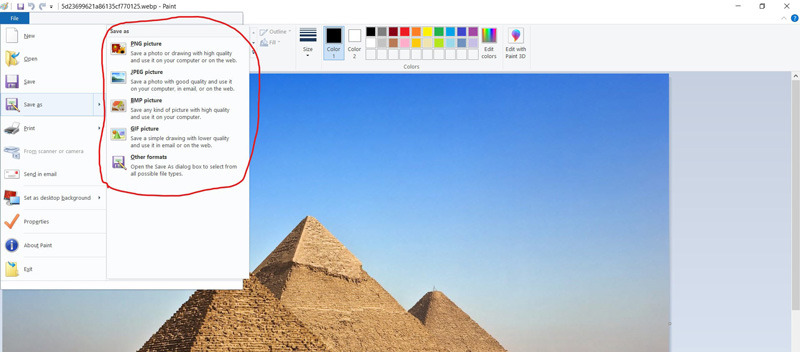
Step-1 Open the image in MS Paint.

Step 2 Click on the file menu, then press the Save button.
You can choose any of the listed formats. So now you can convert webp to png, jpg or any other format or any other format.
Step 3 There’s no step 3.

Did You Miss The Latest?

Join to Build Growth
Build differently. Explore our platform and services for the AI era.
Innovate with purpose. Discover how our advanced AI platform and tailored services empower your business to thrive in the rapidly evolving AI landscape, driving smarter decisions and transformative growth.
Get in touch